
Sebelumnya saya pernah posting artikel tentang, " Cara Membuat Safelink di Blog Utama ", kali ini caranya berbeda, yakni link safelink yang dimaksud adalah link postingan acak.
Manfaat yang didapatkan selain kami berhasil membuat Blog Utama mempunyai halaman Safelink yaitu sebagai berikut.
- Tautan safelink yang dimaksud bukan hanya satu halaman melainkan Random Random Posts
- Tidak rumit membuat skripnya
- Naskahnya disederhanakan sedemikian rupa mungkin
- Mudah untuk dipraktekkan
- Tidak menggunakan berbagai macam CSS yang membuat kita bingung
- Kita mengenal fungsi script jaringan Safelink
Apa kegunaan Blog Safelink?
Banyak Blogger yang memanfaatkan Blog Safelink untuk dijadikan penghasilan tambahan di Blog yang mana di Blog Safelink tersebut terdapat iklan Google AdSense.
Jenis blog apa yang menggunakan Safelink Blog?
Blog Safelink sering digunakan untuk blog-blog yang berisi atau memuat tautan yang harus dituju, seperti Blog unduhan yang menaruh tautan pada setiap postingannya untuk menuju ke tautan yang ingin dituju.
Perlu kita ketahui, Blogger sangat rentan untuk membuat Blog Download, apalagi Blog tersebut memiliki Iklan dari Google AdSense, dalam artian Blog menjalin hubungan kerja sama dengan periklanan Google yang berisi berbagai kebijakan yang harus kita patuhi.
Blog apa yang tepat untuk membuat Blog Safelink?
Meskipun demikian, Blog Safelink digunakan untuk mengunduh Blog, dan Blog yang menautkan ke sebuah postingan.
Kita bisa saja membuat suatu Blog yang membagikan tautan unduhan template secara gratis atau bahkan Blog pada tautan Demo harus terlebih dahulu masuk ke halaman safelink dan kemudian ke tautan sebenarnya.
Sebelum masuk ke tutorial, mari kita bahas terlebih dahulu apa itu Safelink agar kita lebih memahami fungsi dari Safelink itu sendiri.
Safelink merupakan pengalihan link yang diarahkan, seperti anda ingin membuat link untuk menuju ke link youtube, sebelum menuju ke link youtube, link tersebut akan melalui safelink terlebih dahulu.
Apakah Safelink aman dari peretasan, virus, dll.? Tentu saja tidak.
Memang, banyak yang mengartikan Safelink hanya masalah tanggal, apakah malware atau bukan. Dengan menggunakan Safelink, pengguna URL unduhan dapat terhindar dari beberapa virus yang terdeteksi.
Tidak semua script Safelink memiliki fungsi yang sama seperti penjelasan di atas, yang mana Safelink merupakan halaman untuk mengamankan link dari berbagai macam virus dan malware.
Secara umum, skrip Safelink sama saja, menggunakan kode var Base64yang berfungsi untuk mentransfer data tautan URL.
Jadi Safelink itu tidak aman? Tidak juga, bukan itu yang saya maksud, tetapi setiap script dari Safelink secara umum sama saja, hanya saja mungkin akan ditambahkan script lain yang fungsinya tidak sama dengan script Safelink.
Jadi, apakah "Cara Termudah untuk Membuat Safelink Postingan Acak di Blog Utama" ada di postingan ini? Keamanan Halaman Safelink yang dibuat bergantung pada pengguna Blog yang menyediakan halaman Safelink itu sendiri.
Contohnya seperti ini, yaitu Sebuah Blog yang pemiliknya mengaktifkan link URL untuk menuju ke link tersebut yang ternyata adalah link hasil hack atau link negatif. Jadi siapa yang salah siapa? Script Safelink atau Pemilik Blog?
Kesimpulannya, Safelink sendiri merupakan sebuah tautan URL pengalihan yang ingin Anda tuju melalui suatu halaman tertentu terlebih dahulu.
Apa saja yang dibutuhkan atau persiapan untuk membuat Safelink Random Post di Blog Utama?
Berikut ini adalah persyaratan untuk membuat Random Post Safelink di Blog Utama.
Kebutuhan Membuat Postingan Acak Safelink di Blog Utama
- Tombol Safelink css.
- Alihkan kode skrip ?m=1dan &m=1untuk versi seluler.
- Siapkan beberapa postingan Blog.
- Kode skrip Safelink.
Langkah-langkah Membuat Safelink Random Post di Blog Utama
1. Login Blogger.com & Edit HTML
2. Copy the css code below, then place it just abobe </style> or ]]></b:skin>
/* Safelink buttons by bloggerbyte.net */
.button1{display: inline-block;padding: 6px 20px;margin: 15px 0 10px 0;border: 1px solid #ddd;font-size: 13px;color: #414141;border-radius: 30px;cursor: pointer;transition:  all 0.3s ease}
.button1:hover{background: linear-gradient(to right, #5b86e5, #36d1dc);border-color: #5b86e5;color: #fff}
.visit-link,#daplong{margin-right: 0;padding: 7px 30px;line-height: 25px;font-family: Lato, sans-serif;transition: all 0.3s ease-in-out}
.visit-link{padding: 7px 50px}
#HTML99,#HTML99 .widget-content{border: 0!important;margin: 0!important;padding: 0!important}
Put the css code like this

3. Copy the code below and place it or paste it directly above the code </head>
<script type='text/javascript'>
var uri = window.location.toString();
if (uri.indexOf("%3D","%3D") > 0) {
var clean_uri = uri.substring(0, uri.indexOf("%3D"));
window.history.replaceState({}, document.title, clean_uri);
}
var uri = window.location.toString();
if (uri.indexOf("%3D%3D","%3D%3D") > 0) {
var clean_uri = uri.substring(0, uri.indexOf("%3D%3D"));
window.history.replaceState({}, document.title, clean_uri);
}
var uri = window.location.toString();
if (uri.indexOf("&m=1","&m=1") > 0) {
var clean_uri = uri.substring(0, uri.indexOf("&m=1"));
window.history.replaceState({}, document.title, clean_uri);
}
var uri = window.location.toString();
if (uri.indexOf("?m=1","?m=1") > 0) {
var clean_uri = uri.substring(0, uri.indexOf("?m=1"));
window.history.replaceState({}, document.title, clean_uri);
}
</script>
Put the code like this
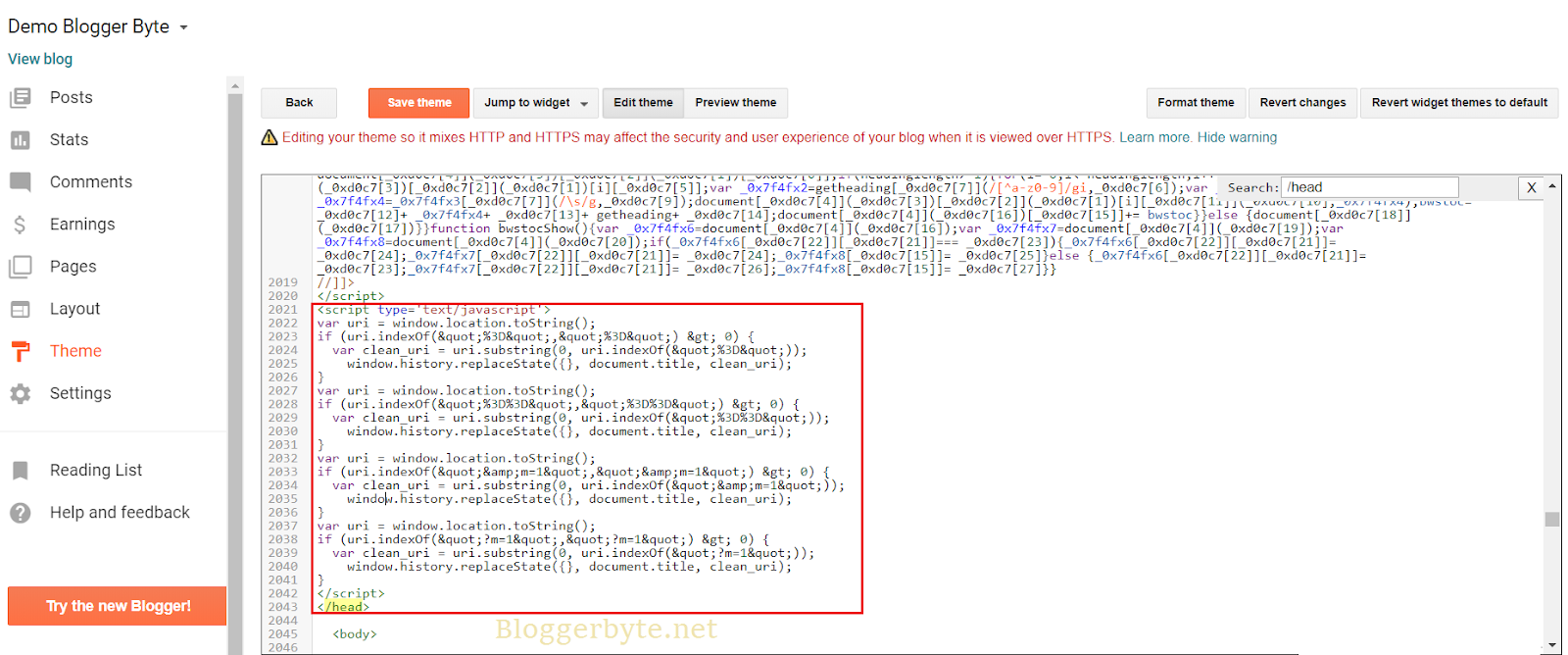
3. Make a few new posts and add a little touch of the code below in HTML mode, not in Compose mode ... If you put the code below in HTML mode then we open Compose mode and then return to HTML mode there will be an error too . So try not to open compose mode. If you are forced to be curious, please do not open compose mode after placing the code below, then return to HTML mode again and fix the href = #linkcode or the topmost code by removing the code before the # code in the code #link.
<center>
<a class="button1" href="#link" title="Go to Download link">Go To Download Link</a></center>
--- Article ---
--- Image / Article ---
--- Article ----
<center>
<div id="link">
</div>
<script type="text/javascript">
//<![CDATA[
function changeLink() {
    var e = Base64.decode(res);
    window.open(e, "_blank")
}
var currentURL = location.href,
    str = currentURL,
    res = str.replace("Post/Page URL.html?url=", "");
document.write('<a class="visit-link button1" style="cursor:pointer" onclick="changeLink()">Click Here To Download</a>');onload: generate();//]]>
</script></center>
--- Article ---
--- Image / Article ---
--- Article ---
Replace the Post/Page URL.html with the URL of the post page that we created. The URL page must match the URL of your post, because later when we make a new post again, the code above or the Post/Page URL.html will be different. Maybe the URLs we save in notepad first fall with a simple writing format to distinguish the URL page 1 with another page URL. URL page 1: https: // .......... html URL page 2: https: // .......... html URL page 3: https: // ....... ...html URL page 4: https: // .......... html Do it So that later we are easy to continue the next step.
4. Copy the code below and place it or paste it directly above the code </body> in the HTML Edit in the Blogger Dashboard .
<script type='text/javascript'>
var Base64={_keyStr:"ABCDEFGHIJKLMNOPQRSTUVWXYZabcdefghijklmnopqrstuvwxyz0123456789+/=",encode:function(input){var output="";var chr1,chr2,chr3,enc1,enc2,enc3,enc4;var i=0;input=Base64._utf8_encode(input);while(i<input.length)
{chr1=input.charCodeAt(i++);chr2=input.charCodeAt(i++);chr3=input.charCodeAt(i++);enc1=chr1>>2;enc2=((chr1&3)<<4)|(chr2>>4);enc3=((chr2&15)<<2)|(chr3>>6);enc4=chr3&63;if(isNaN(chr2)){enc3=enc4=64;}else if(isNaN(chr3)){enc4=64;}
output=output+ this._keyStr.charAt(enc1)+ this._keyStr.charAt(enc2)+ this._keyStr.charAt(enc3)+ this._keyStr.charAt(enc4);}
return output;},decode:function(input){var output="";var chr1,chr2,chr3;var enc1,enc2,enc3,enc4;var i=0;input=input.replace(/[^A-Za-z0-9\+\/\=]/g,"");while(i<input.length)
{enc1=this._keyStr.indexOf(input.charAt(i++));enc2=this._keyStr.indexOf(input.charAt(i++));enc3=this._keyStr.indexOf(input.charAt(i++));enc4=this._keyStr.indexOf(input.charAt(i++));chr1=(enc1<<2)|(enc2>>4);chr2=((enc2&15)<<4)|(enc3>>2);chr3=((enc3&3)<<6)|enc4;output=output+ String.fromCharCode(chr1);if(enc3!=64){output=output+ String.fromCharCode(chr2);}
if(enc4!=64){output=output+ String.fromCharCode(chr3);}}
output=Base64._utf8_decode(output);return output;},_utf8_encode:function(string){string=string.replace(/\r\n/g,"\n");var utftext="";for(var n=0;n<string.length;n++){var c=string.charCodeAt(n);if(c<128){utftext+=String.fromCharCode(c);}
else if((c>127)&&(c<2048)){utftext+=String.fromCharCode((c>>6)|192);utftext+=String.fromCharCode((c&63)|128);}
else{utftext+=String.fromCharCode((c>>12)|224);utftext+=String.fromCharCode(((c>>6)&63)|128);utftext+=String.fromCharCode((c&63)|128);}}
return utftext;},_utf8_decode:function(utftext){var string="";var i=0;var c=c1=c2=0;while(i<utftext.length){c=utftext.charCodeAt(i);if(c<128){string+=String.fromCharCode(c);i++;}
else if((c>191)&&(c<224)){c2=utftext.charCodeAt(i+ 1);string+=String.fromCharCode(((c&31)<<6)|(c2&63));i+=2;}
else{c2=utftext.charCodeAt(i+ 1);c3=utftext.charCodeAt(i+ 2);string+=String.fromCharCode(((c&15)<<12)|((c2&63)<<6)|(c3&63));i+=3;}}
return string;}}
var encode=document.getElementById('encode'),decode=document.getElementById('decode'),output=document.getElementById('output'),input=document.getElementById('input');var User_ID="";var protected_links="";var a_to_va=0;var a_to_vb=0;var a_to_vc="";function auto_safelink(){auto_safeconvert();}
function auto_safeconvert(){var a_to_vd=window.location.hostname;if(protected_links!=""&&!protected_links.match(a_to_vd))
{protected_links+=", "+ a_to_vd;}else if(protected_links=="")
{protected_links=a_to_vd;}
var a_to_ve="";var a_to_vf=new Array();var a_to_vg=0;a_to_ve=document.getElementsByTagName("a");a_to_va=a_to_ve.length;a_to_vf=a_to_fa();a_to_vg=a_to_vf.length;var a_to_vh=false;var j=0;var a_to_vi="";for(var i=0;i<a_to_va;i++)
{a_to_vh=false;j=0;while(a_to_vh==false&&j<a_to_vg)
{a_to_vi=a_to_ve[i].href;if(a_to_vi.match(a_to_vf[j])||!a_to_vi||!a_to_vi.match("http"))
{a_to_vh=true;}
j++;}
if(a_to_vh==false)
{var encryptedUrl=Base64.encode(a_to_vi);
var x=Math.floor((Math.random()*4)+ 1);
var xxx=null;
if(x=="1"){xxx="Year / Month / URL page1.html"}
if(x=="2"){xxx="Year / Month / URL page2.html"}
if(x=="3"){xxx="Year / Month / URL page3.html"}
if(x=="4"){xxx="Year / Month / URL page4.html"}
a_to_ve[i].href="https://blogURL.blogspot.com/"+xxx+"?url="+ encryptedUrl;a_to_ve[i].rel="nofollow";a_to_vb++;a_to_vc+=i+":::"+ a_to_ve[i].href+"\n";}}
var a_to_vj=document.getElementById("anonyminized");var a_to_vk=document.getElementById("found_links");if(a_to_vj) {a_to_vj.innerHTML+=a_to_vb;}
if(a_to_vk)
{a_to_vk.innerHTML+=a_to_va;}}
function a_to_fa()
{var a_to_vf=new Array();protected_links=protected_links.replace(" ","");a_to_vf=protected_links.split(",");return a_to_vf;}
protected_links ='facebook.com,twitter.com,youtube.com,instagram.com,blogURL.blogspot.com,1.bp.blogspot.com,2.bp.blogspot.com,3.bp.blogspot.com,4.bp.blogspot.com,5.bp.blogspot.com';
auto_safelink();
</script>
<style>a{cursor:pointer}</style>
Set Up script Like This

Pay attention to the code var x=Math.floor((Math.random()*4)+ 1); replace number 4 with the number of posts you want to make the Safelink page earlier. here I make a safelink page with the number 2 in accordance with the demo that I made below (see in the image).
In the code there are years / months / and sub URL page.html. Change the Year, Month, and Sub URL page that matches the URL of the post we made earlier. the example below with the URL page that we read this.
https://www.bloggerbyte.net/2020/01/random-post-safelink-on-main-blog.htmlIn the example of the right link above, there is a URL page that contains elements of Year, Month, and sub URL pages that match the URL of the post we are reading. We replace all the code that we need to replace from Year, Month, sub URL page with the URL page some of the posts we made earlier from URL page 1, URL page 2, URL page 3 and URL page 4 (you can increase or decrease the pages or post according to you) that we saved in the notepad earlier.
Replace the blogURL code with our blogURL code example bloggerbyte1.blogspot.com - in image
Pay attention to the code protected_links =, the code is a Protected Link which when we fill in various domain links or website links will not lead to the safelink page. So it is mandatory to change but not everything has to be changed, because there are some important links that are required to be changedProtected Link , for example 1.bp.blogspot.com, 2.bp.blogspot.com, 3.bp.blogspot.com, 4.bp.blogspot.com and 5.bp.blogspot.com where the link is the link code from Default image from Blogger itself. So if we remove the link code will result in an image that we have displayed on every post on our Blog will lead to the safelink page first to see the image when clicked on the picture.
What must be changed in the Protected Link is blogURL.blogspot.com or your website link, such as the example blogURL on bloggerbyte1, namely bloggerbyte1.blogspot.com - as above image without the code https:// in front of it.
For the code <style>a {cursor:pointer}</style> is the CSS of the link when directed to the cursorwhile on the link, the cursor is in the shape of a hand which illustrates that the text highlighted by the cursor has a link inside it.
5. Save our theme.
That's it you have successfully implemented "Random Posts Safelink on Main Blog". Has anyone still not been able to practice this method? If it still exists, please comment on the comments box.